Who is this guide for?
For the building manager who wants to remind residents who have not paid a certain charge with an SMS message.
Before you begin
- The building must have sufficient SMS credit.
- The reminder button only appears on a charge that is Unpaid or partially paid.
Steps
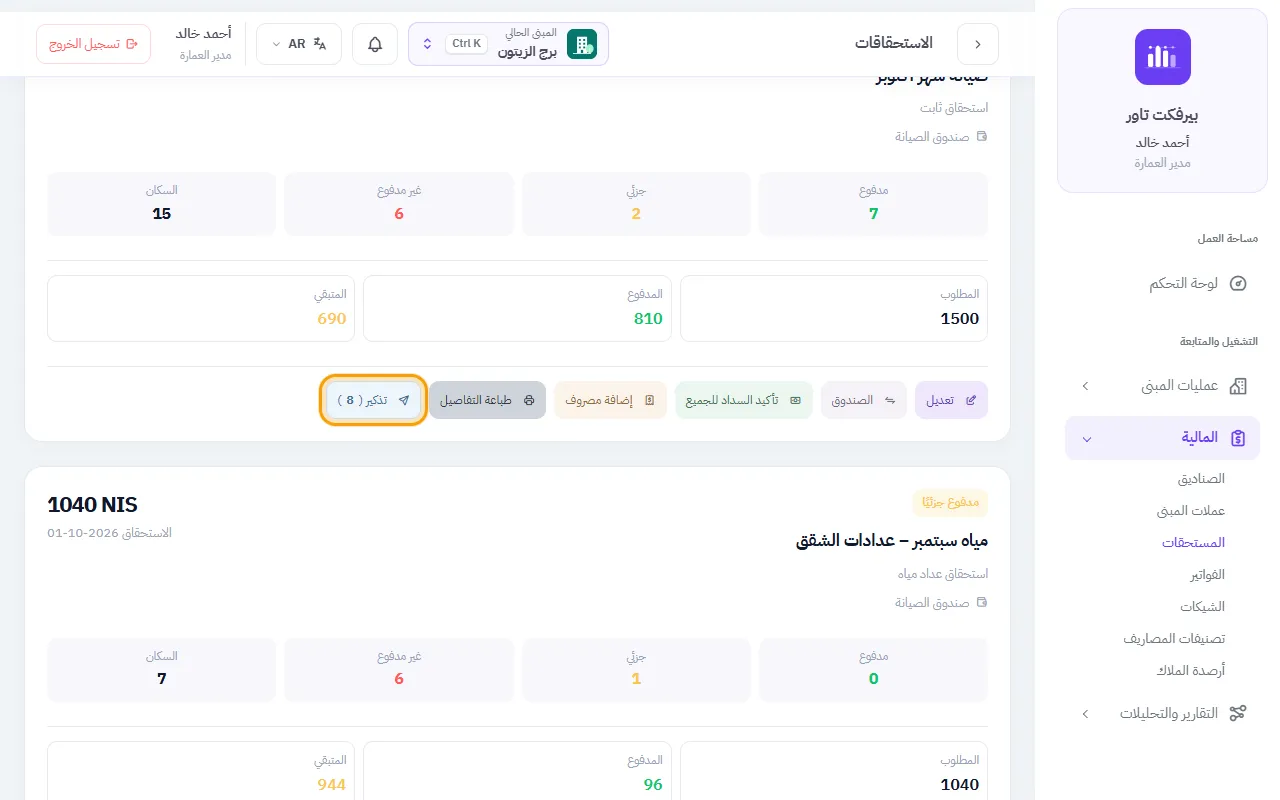
- From Finance ← Charges Find the accrual. You can use the Status or Delayed Only filter from Advanced Filter.
- Click the Reminder button on the card, and next to it is the number of unpaid people, for example “Reminder (4)”.
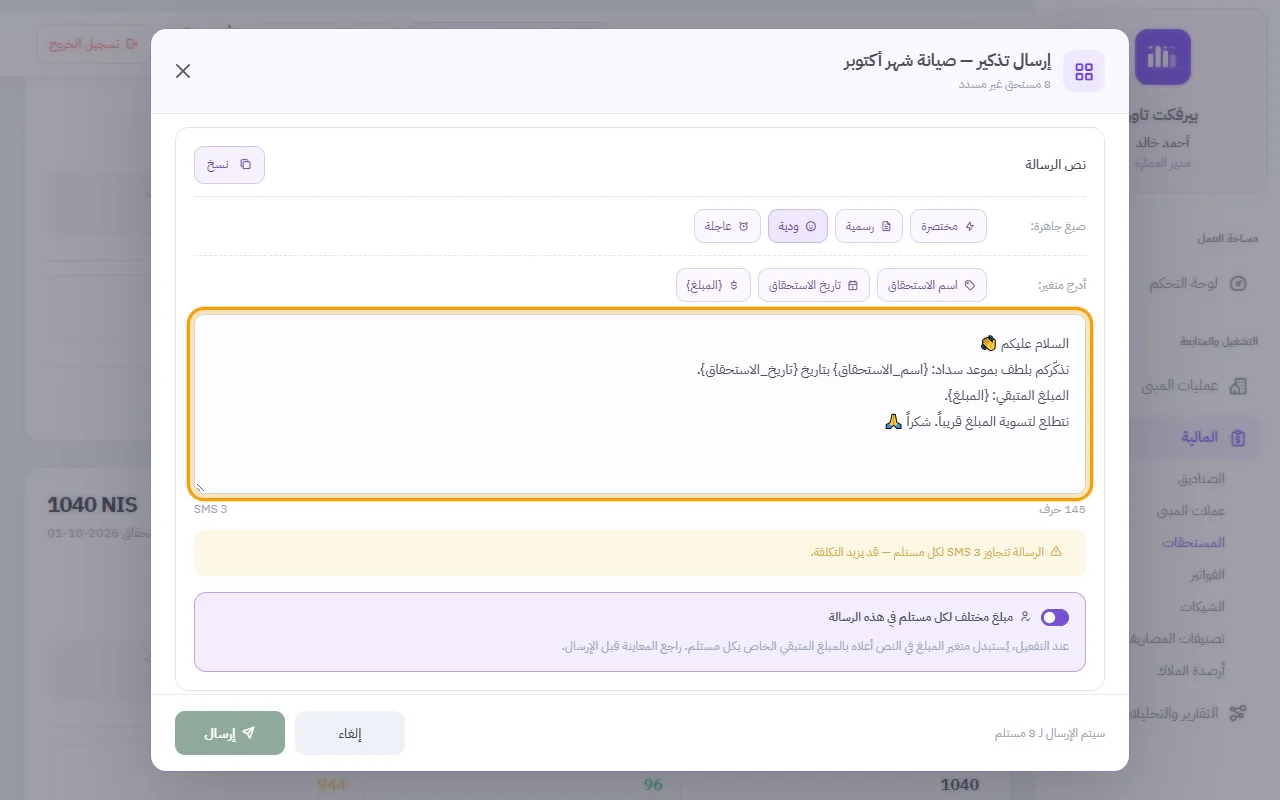
- In the Send Payment Reminder window, choose the message type Financial or General.
- Type message or choose from ready-made: brief, formal, friendly, urgent. You can include variables such as Due Name, Due Date, and {Amount}.
- To send the remaining amount to each resident, activate Allocate amount to each recipient ({Amount} required in text).
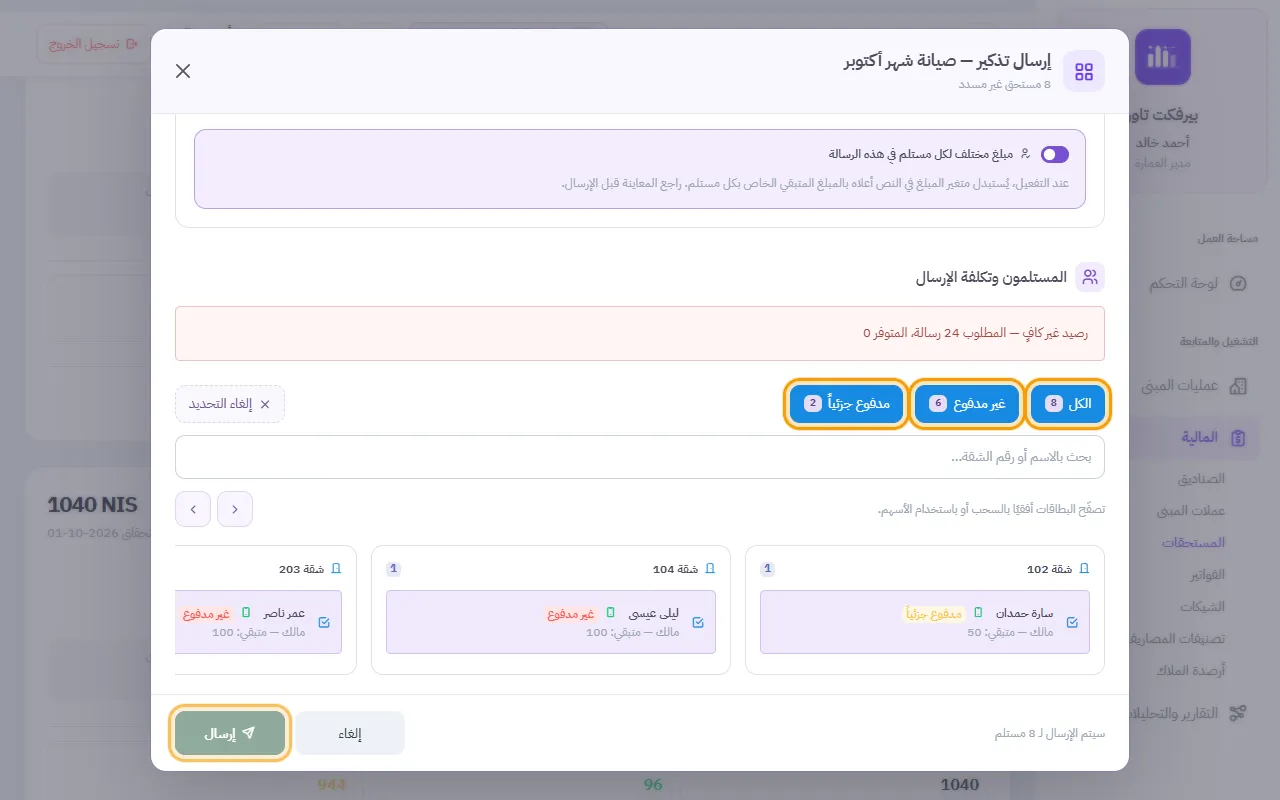
- See the recipients: All / Unpaid / Partially Paid, and uncheck those you don't want to email.
- Click Submit.
Result
Messages are sent and the system displays the number of sent and failed messages. Example: “Dear resident, we remind you to pay the November maintenance, the remaining amount is 20 dinars.”
Important notes
- A long message may count more than one SMS per recipient, increasing the cost.
- For automatic reminders before and after a late appointment, use Automatic Due Generation ← Due Reminder Settings.
- If the Reminder button does not appear, you do not have permission — contact your building manager.
-
1Step 1
من المالية ← المستحقات ابحث عن الاستحقاق (أو استخدم فلتر الحالة أو متأخرة فقط)، واضغط تذكير على البطاقة؛ بجانبه عدد غير المسددين.
-
2Step 2
في نافذة إرسال تذكير سداد اختر نوع الرسالة (مالي أو عام)، واكتب النص أو اختر صيغة جاهزة: مختصرة، رسمية، ودية، عاجلة، مع متغيرات مثل اسم الاستحقاق وتاريخه و{المبلغ}. فعّل المبلغ المختلف لكل مستلم ليصل كل ساكن ما تبقى عليه.
-
3Step 3
راجع المستلمين: الكل / غير مدفوع / مدفوع جزئياً، وألغِ من لا تريد مراسلته، ثم اضغط إرسال. يحتاج المبنى رصيد رسائل SMS كافٍ، والرسالة الطويلة قد تُحتسب أكثر من رسالة.
Who is this guide for?
For the building manager who wants to remind late residents to pay from mobile.
What is available in the application?
Sending a manual reminder to non-payers for a particular charge is currently available from the web panel only (the Reminder button on the charge card). From the application you can set automatic reminders that the system sends itself.
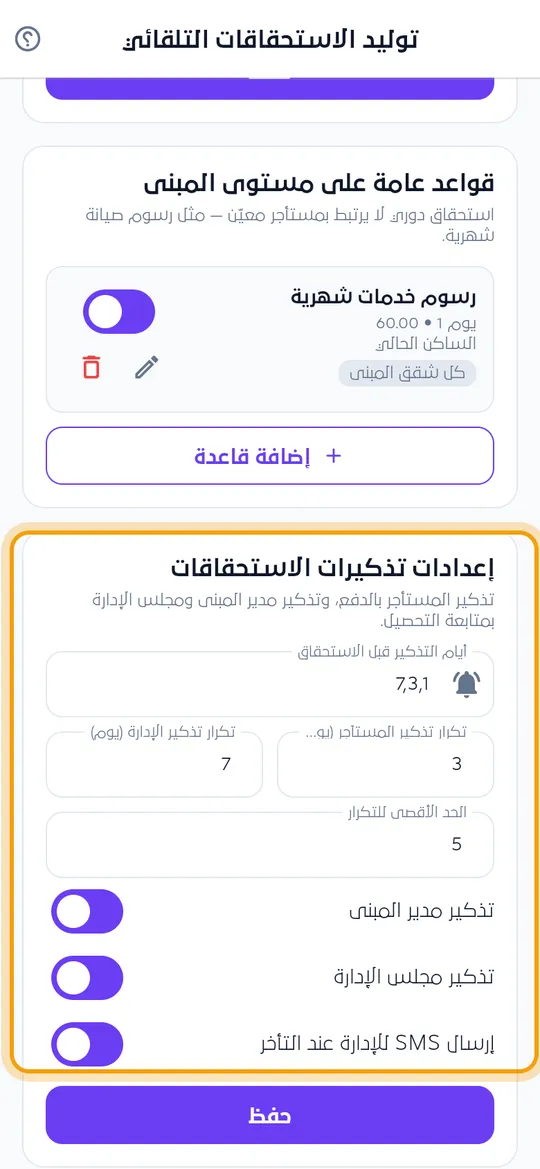
Steps: Set automatic reminder
- Click More then Automatic Accrual Generation.
- Scroll down to the Due Reminders Settings.
- In reminder days before due type the days separated by a comma, example: 3,1 (reminder 3 days before and 1 day before).
- Select Tenant Reminder Frequency (Day) after delinquency, Example 3, Management Reminder Frequency (Day), and Maximum Frequency, Example 5.
- Enable Building Manager Reminder and/or Board Reminder, and Send SMS to management when late if desired.
- Click Save; The message Reminder settings were saved successfully.
Follow up on latecomers
From the Charges tab, filter by Payment Status to see Pending and Partial, and open the charge to see who has not paid in Beneficiaries.
Important notes
- The message Enter at least one day for the reminder before the due date means that the days field is empty.
- SMS messages consume the building's message balance.
-
1Step 1
إرسال تذكير يدوي لغير المسددين متوفر من لوحة الويب. من التطبيق تضبط التذكيرات التلقائية: المزيد ← توليد الاستحقاقات التلقائي ثم قسم إعدادات تذكيرات الاستحقاقات: أيام التذكير قبل الاستحقاق (مثال: 3,1)، وتكرار التذكير بعد التأخر، والحد الأقصى، ومن يُبلَّغ من الإدارة.